

In the real world, data rarely behaves like a solitary island; it arrives in streams, batches, and collections. Whether you are processing a week’s worth of temperature readings or managing a dynamic digital shopping cart, how you store that data defines the efficiency of your code. Python provides two primary tools for this job: lists and tuples.
These sequences are the bedrock of Python programming, yet they serve distinctly different purposes. Understanding when to use a flexible, mutable list regarding a rigid, immutable tuple is often the difference between writing scripts that merely function and writing robust applications.
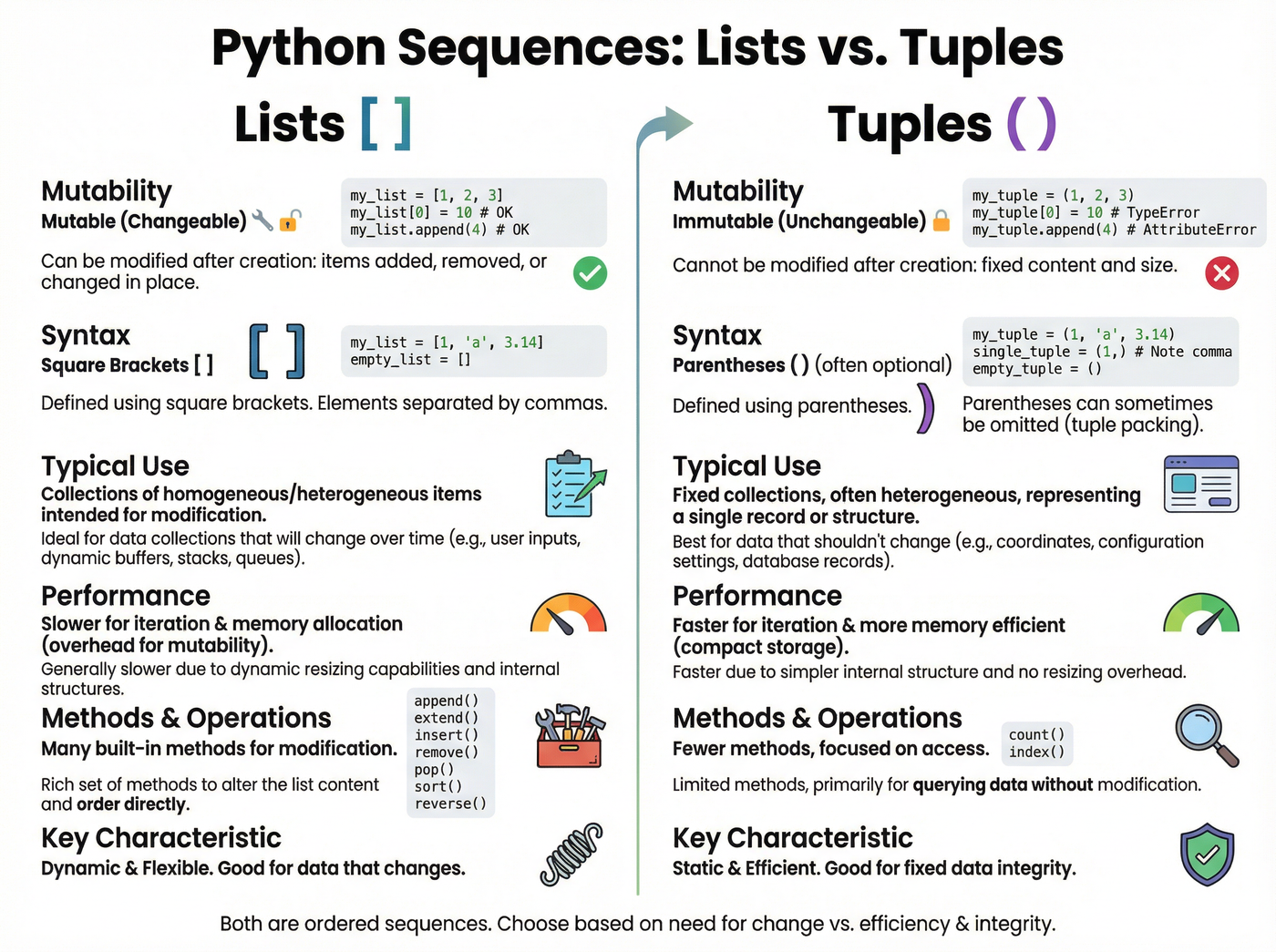
- Lists are mutable tools: Think of a list as a flexible workbench where items can be added, removed, or swapped at any time.
- Zero-based indexing: Python counts starting from zero, meaning the first item in your sequence is always at index 0.
- Negative indexing is powerful: You can access the end of a list directly using -1, which is crucial for handling live data streams.
- Tuples offer protection: Unlike lists, tuples cannot be changed after creation, making them ideal for fixed records like geographic coordinates.
The Python List: A Mutable Workbench
A list is Python’s most versatile sequence type. It is an ordered collection of items that you can modify in place, which makes it mutable. You create a list by enclosing comma-separated values inside square brackets [].[1]
Because lists are designed to change, they come equipped with built-in methods that allow you to grow or shrink the collection dynamically. This makes them perfect for scenarios like a shopping cart or a to-do list where the data is constantly evolving.[3]
Adding and Removing Items
To add an item to your list, you use the .append() method. This adds the new element to the very end of the sequence. For example, if you have a list called cart, running cart.append("eggs") modifies the original list directly.
When you need to combine two lists, you might be tempted to use the + operator. However, for performance in large loops, the .extend() method is often preferred as it adds elements from an iterable to the existing list rather than creating a new one.[2]
Removing items is just as straightforward. The .remove(x) method searches for the first occurrence of the value x and deletes it. Be aware that if the item appears multiple times, only the first instance is removed. If the item doesn’t exist, Python will raise an error.[6]
Navigating Data: Indexing and Slicing
Storing data is only half the battle; retrieving it efficiently is where Python shines. Python sequences rely on a zero-based indexing system. This means the first item in your list is at index 0, the second is at index 1, and so on.[1]
The Power of Negative Indexing
One of Python’s most beloved features is negative indexing. Instead of calculating the length of the list to find the last item, you can simply ask for index -1. The second-to-last item is -2, and so forth. This is particularly useful when dealing with data streams where you always want to check the most recent entry but don't know the exact size of the dataset.
Slicing Subsections
Slicing allows you to extract a specific portion of a list using the syntax list[start:stop]. It is crucial to remember the rule: inclusive start, exclusive stop. The slice includes the element at the start index but stops right before the stop index.[5]
For instance, cart[0:2] will give you the items at index 0 and 1, effectively treating the stop number as the limit line that cannot be crossed.

Lists vs. Tuples: The Choice Matters
While lists are flexible, tuples are immutable. Created using parentheses (), a tuple lock its data in place upon creation. You cannot add, remove, or change items in a tuple.[3]
Why use a structure you can't change? The answer lies in data integrity. Tuples are ideal for storing data that shouldn't change, such as the latitude and longitude of a city or the RGB values of a specific color. Using a tuple signals to other developers (and the program itself) that this data is a fixed record, not a collection that needs editing.[5]
Listen to the episode
For a deeper dive into manipulating sequences and hearing practical examples of when to choose a list over a tuple, tune in to the full episode below.
Listen to Lists & Tuples: Working with Sequences