Learning to program is less about memorizing obscure commands and more about learning how to think clearly. Python, one of the world's most popular programming languages, was built on this very premise. Whether you aspire to build artificial intelligence, automate boring tasks, or simply understand how computers work, your journey begins with a single line of code.
In this guide, we break down the essentials of your first Python script, exploring why this language has become the standard for modern innovation and how you can start speaking it today.
Listen to the episode
Dive deeper into the philosophy and mechanics of Python by listening to our full episode:
Listen to Getting Started: Your First Python Program
The Philosophy: Readability First
Python was created in the late 1980s by Guido van Rossum with a radical idea: code is read much more often than it is written. This philosophy sets Python apart from older languages that often prioritize machine efficiency over human understanding.[1]
In high-pressure fields like data science and AI, where teams collaborate on massive projects, the ability to quickly understand someone else's logic is invaluable. Python’s syntax is designed to look uncluttered and almost like English, removing the visual noise that plagues other languages. This low barrier to entry transforms the computer from a mysterious black box into a flexible tool you can command.[5]
Your First Command: Hello, World!
The traditional first step in any programmer’s journey is the "Hello, World!" program. In languages like Java or C++, this might require several lines of setup code. Python, sticking to its "batteries included" philosophy, allows you to execute this with just one line:
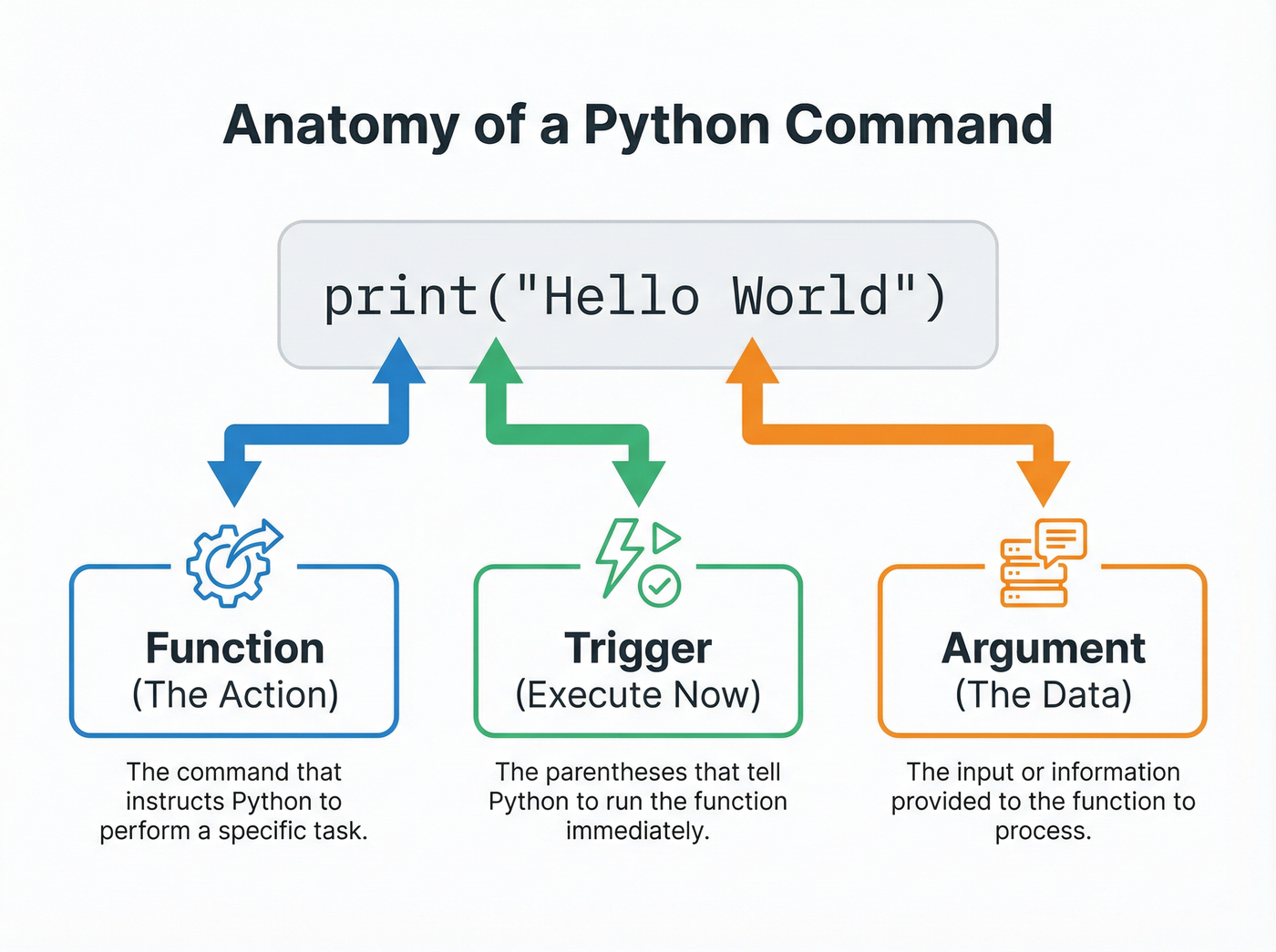
print("Hello, World!")This simplicity lets you focus on the logic rather than the setup. Let's break down the anatomy of this command:
- print(): This is a built-in function that instructs Python to output data to the screen.
- Parentheses (): These tell Python to execute the function immediately.
- Strings: The text inside the quotes—
"Hello, World!"—is called a string. You can use single or double quotes, provided they match.[6]
If you wanted to print a number, you could simply type print(42) without quotes. Python naturally understands different data types, reducing the friction between your thought process and the machine's execution.
The Art of Explaining: Comments
As your scripts grow from one line to one hundred, memory fades. You might forget why you wrote a specific block of code a certain way. This is where comments become essential. By typing a hash symbol (#), you tell Python to ignore everything waiting on the rest of that line.[1]
Comments are for humans, not computers. While good code should be self-explanatory, comments provide the context—the "why" behind the "how." For example:
# Calculate the area of a circle
print(3.14 * 5 * 5)
Without the comment, the numbers might look arbitrary. With it, the intent is clear.[6]
Whitespace and Indentation
One of Python's most famous (and sometimes controversial) features is its strict adherence to indentation. In many other languages, blocks of code are wrapped in curly braces {}. In Python, structure is defined by whitespace—the empty space at the start of a line.
If you are writing a script that involves decisions or loops, you must indent your code consistently. If the indentation is off, the interpreter will return an error and the program will not run. This forces beginners and experts alike to write code that is ensuring that projects remain readable regardless of who wrote them.[5]
Running Your Code
There are two primary ways to run Python code. You can use an interactive REPL (Read-Eval-Print Loop) to type commands and see immediate results—perfect for testing small ideas like math operations or string manipulation. Alternatively, you can write your code in a text file ending in .py (a script) and run the file entirely from start to finish.[3]
Whichever method you choose, the key is active practice. Reading about code is helpful, but typing print("Hello, World!") yourself bridges the gap between theory and reality.