

Tired of code that just plods along in a straight line? It is time to inject some intelligence into your programs. By default, Python executes scripts sequentially—line by line, from top to bottom. However, real-world problems require software that can ask questions and react to changing conditions. This concept is known as control flow.
Today, we dive into the architectural trio of Python's decision-making tools: if, elif, and else statements. These keywords allow your code to branch into different paths, responding dynamically to user input or data values rather than following a rigid script.
- The Gatekeeper: The
ifstatement runs code only when a specific condition is true. - The Fallback: The
elsestatement acts as a “Plan B” when previous conditions are not met. - Handling Multiple Options: The
elifstatement allows you to check a sequence of possibilities, like a grading system. - The "Equals" Trap: Using
=instead of==is the most common beginner mistake. - Logic Operators: Use
and,or, andnotto combine complex conditions.
The Gatekeeper: The if Statement
The journey into logic begins with the if statement. Think of this as a gatekeeper. It checks a specific condition using a test that evaluates to either True or False. If the condition is true, the indented block of code immediately following the statement opens up and executes. If it is false, the program simply skips that block entirely.
For example, you might ask Python to print a warning only if a variable num is greater than 100. If the number is smaller, the program stays silent and carries on.[1][6]
The Fallback: The else Statement
Conditional statements do not have to include an alternative plan. If you only provide an if statement and the condition is false, Python simply does nothing suitable for that specific check.[1] However, robust programs often need a catch-all.
The else statement provides this safety net. It serves as a plan B that executes only when the primary if condition fails. This ensures that your program always handles the situation, regardless of the data state.
Handling Complexity with elif
Real-world decisions are rarely binary. You often need to evaluate more than just "yes" or "no." To handle multiple distinct possibilities, Python utilizes elif, which stands for "else if."
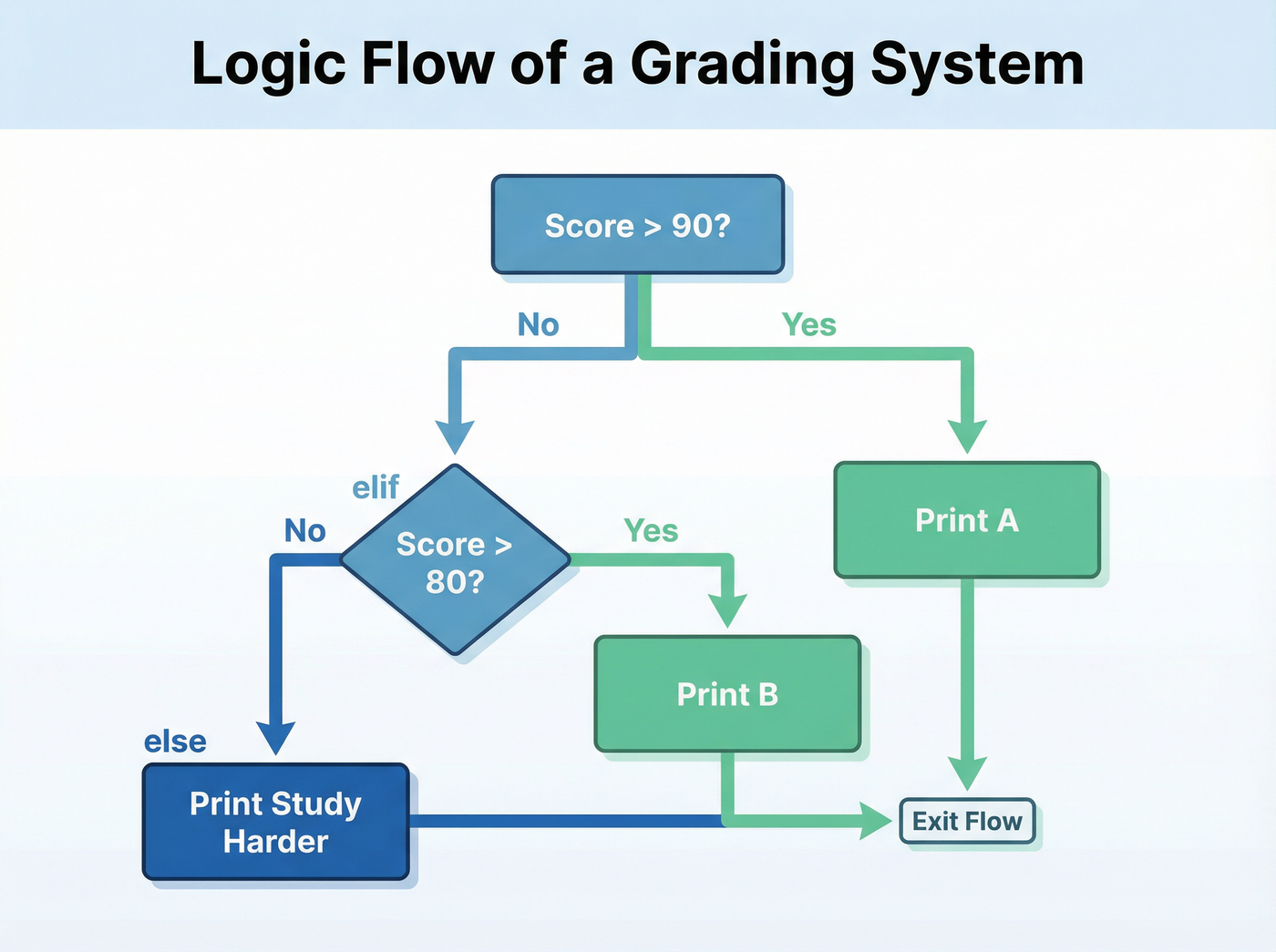
Programmers use elif to chain specific checks together in a sequence. Python evaluates these conditions in order. It is critical to note that only the first matching condition is executed. Once a condition evaluates to true, Python runs that block and ignores the rest of the chain.[3]
Example: The Grading System
A classic example of chaining logic is assigning letter grades based on distinct numerical scores. This structure prevents conflicting rules and keeps the flow clear.
The Common Pitfall: Assignment vs. Comparison
One of the most frequent stumbling blocks for beginners is distinguishing between setting a value and checking a value. In Python, these are two completely different operations handled by similar-looking symbols.
- Assignment (
=): A single equals sign sets a variable. For instance,temperature = 10tells the computer, "Make the variable temperature equal to 10." - Comparison (
==): A double equals sign asks a question. Writingtemperature == 10asks, "Is the stored temperature currently equal to 10?"
Confusing these two can lead to bugs where you accidentally overwrite data when you meant to just check it.[5] always remember: one equals sign sets, two equals signs compare.
Building Sophisticated Logic
As your programs grow, you will need tools to combine multiple requirements or create intricate decision trees.
Logical Operators
Python provides three main keywords to combine conditions:
andRequires every part of the statement to be true. This is ideal for security checks, such as requiring code to verify a username and a password.orRequires only one part of the statement to be true. This offers flexibility.notReverses the result of a condition. This is often used to check for empty lists or missing data by asking if something is not true.[5]Nested Conditions
For truly intricate scenarios, you can place an if statement inside another if statement. This is called nesting.
Imagine a banking app logic: the outer loop might check if card_is_active. Only if that is true does the program enter the inner block to check if balance > withdrawal_amount. While powerful, beware of nesting too deeply. Over-nested logic, often called "spaghetti code," becomes difficult to read. Expert practitioners often suggest "flattening" logic using operators like and to keep the code transparent.[4]

The Goal: Clarity Over Cleverness
Whether you are building a simple calculator or a complex data analysis tool, the goal of control flow is not just to make the code work, but to make it understandable. A program’s decision tree should be clear enough that you—or another developer—can understand the logic six months from now.
Listen to the episode
Dive deeper into conditional logic and hear more examples by listening to the full episode below.
Control Flow: Making Decisions with If Statements